摸索AI(三)Spring AI实现的更多Api实践
Spring Ai
admin 发布于:2026-02-05 13:28:41
阅读:loading
之前也是花了巨多的时间从Github上下载了一些AI摸索的实践项目,涉及到的有文生图、文生视频、图生图、语音克隆、数字人等,它们的实践对电脑配置的依赖有一定的要求,而且实践的过程复杂程度较高,属于摸索着玩玩而已。本次摸索AI的范围则是面向对擅长领域的代码接入实践。如果你对Java代码交互的AI大模型有一些兴趣,又或者是跟我一样不知从哪里入手,或许看看我这里分享的前后实践过程与实践的案例范围,也是不错的选择。
所以,本系列教程相关的实践是在本地部署大模型,并且使用Java代码与本地的大模型进行交互。除了本地部署的大模型以为,也是可以付费接入网络上的一些付费大模型,比如Deepseek、千问等等,但是对我个人来讲,私有化的本地大模型更加有意义,毕竟可以免费的集成到企业级应用实践当中。
1.Spring AI API
Spring AI是什么在前篇文章中有了一个简单的介绍,本篇文章着重介绍使用Spring AI的API来调用大模型接口的几种实现(这几种实现是我个人浅浅的摸索而出,不知道整个网上主推的API是什么样子的),也属于Spring Ai的更多API应用(或者是前篇文章的API补充),主要实践以HTTP接口同步调用为主。前文也提及到了call的方法调用最为简单,本次实践则是侧重于对于传递参数的精准控制,参考如下:
(1)更多参数设置
@Test
public void test1() {
    final OpenAiChatModel client = OpenAiChatModel.builder().openAiApi(
            OpenAiApi.builder().apiKey("Chendd").baseUrl("http://localhost:11434").completionsPath("/v1/chat/completions").build()
    ).defaultOptions(
            OpenAiChatOptions.builder()
                    .model("qwen3-vl:2b")
                    .temperature(0.55D)
                    .streamUsage(false)
                    .maxTokens(3000)
                    .topP(1D)
                    .N(5)
                    .build()
    ).build();
    final ChatResponse response = client.call(new Prompt("1 + 1 等于几?2 + 2 等于几?我只想要简洁的答案"));
    final AssistantMessage output = response.getResult().getOutput();
    System.out.println(JSON.toJSONString(output , true));
}
(2)全量参数设置
@Test
public void test2() {
    final SimpleClientHttpRequestFactory httpRequestFactory = new SimpleClientHttpRequestFactory();
    httpRequestFactory.setConnectTimeout(Duration.ofSeconds(5));
    httpRequestFactory.setReadTimeout(Duration.ofMinutes(100));
    final RestTemplate restTemplate = new RestTemplate(httpRequestFactory);
    restTemplate.setInterceptors(Collections.singletonList(new LoggingRequestInterceptor()));
    final OpenAiApi client = OpenAiApi.builder().baseUrl("http://localhost:11434").apiKey("Chendd")
            .restClientBuilder(RestClient.builder(restTemplate))
            .build();
    HttpHeaders headers = new HttpHeaders();
    headers.add(HttpHeaders.CONTENT_TYPE, MediaType.APPLICATION_JSON_VALUE);
    List<OpenAiApi.ChatCompletionMessage> messages = new ArrayList<>();
    String content =
            """
            你是一个专业的问答专家,请使用中文回答问题。只输出结构化JSON数组,不返回任何解释、说明、思考过程。
            请严格按照这个JSON结构的对象输出:{"title":"用户提问的问题" , "content" : "你回答的答案"}。
            """;
    messages.add(new OpenAiApi.ChatCompletionMessage(content , OpenAiApi.ChatCompletionMessage.Role.SYSTEM));
    messages.add(new OpenAiApi.ChatCompletionMessage("How are you?" , OpenAiApi.ChatCompletionMessage.Role.USER));
    ResponseFormat responseFormat = new ResponseFormat(ResponseFormat.Type.JSON_OBJECT ,
    """
            {
                "schema" : {
                    "type" : "object",
                    "properties" : {
                        "title" : {"type" : "string"},
                        "content" : {"type" : "string"}
                    }
                },
                "name" : "response_json",
                "required" : ["title" , "content"]
            }
            """);
    //使用全量参数进行构造
    OpenAiApi.ChatCompletionRequest chatRequest = new OpenAiApi.ChatCompletionRequest(messages ,
            "qwen3-vl:2b" , null , null , 1.00 , null , null , null ,
            4096 , null ,
            1 , null , null , 1.00 ,
            responseFormat , null , null , null , false , null,
            0D , 1D , null , null , null , null ,
            null , null , null , null , null , null);

    //设置更多扩展参数
    chatRequest.extraBody().put("echo" , true);

    final ResponseEntity<OpenAiApi.ChatCompletion> chatCompletionEntity = client.chatCompletionEntity(chatRequest, headers);
    System.out.println(chatCompletionEntity);
    @SuppressWarnings("DataFlowIssue")
    final OpenAiApi.ChatCompletion.Choice choice = chatCompletionEntity.getBody().choices().get(0);
    final String result = choice.message().content();
    System.out.println(result);
}
(3)底层Api参数验证,访问:/v1/completions 接口
@Test
public void test3() {
    final ResponseEntity<LinkedHashMap> responseEntity = RestClient
            .builder()
            .build()
            .post()
            .uri("/v1/completions")
            .header(HttpHeaders.CONTENT_TYPE, MediaType.APPLICATION_JSON_VALUE)
            .body(
                    """
                            {
                              "prompt" : "1+1等于几?",
                              "model": "qwen3-vl:2b",
                              "frequency_penalty": 0.5,
                              "max_tokens": 30000,
                              "n": 2,
                              "presence_penalty": 0.5,
                              "stream": false,
                              "temperature": 0.5,
                              "top_p": 1.0,
                              "echo": true
                            }
                    """
            )
            .retrieve().
            toEntity(LinkedHashMap.class);
    System.out.println(responseEntity);
}
(4)底层Api参数验证,访问:/v1/chat/completions 接口
@Test
public void test4() {
    final SimpleClientHttpRequestFactory httpRequestFactory = new SimpleClientHttpRequestFactory();
    httpRequestFactory.setConnectTimeout(Duration.ofSeconds(5));
    httpRequestFactory.setReadTimeout(Duration.ofMinutes(100));
    final RestTemplate restTemplate = new RestTemplate(httpRequestFactory);
    restTemplate.setInterceptors(Collections.singletonList(new LoggingRequestInterceptor()));
    final ResponseEntity<OpenAiApi.ChatCompletion> responseEntity = RestClient
            .builder(restTemplate)
            .build()
            .post()
            .uri("/v1/chat/completions")
            .header(HttpHeaders.CONTENT_TYPE, MediaType.APPLICATION_JSON_VALUE)
            .body(
                    """
                    {
                      "messages": [
                        {
                          "content": "你是一个专业的问答专家,请使用中文回答问题。只输出结构化JSON数组,不返回任何解释、说明、思考过程。\\n请严格按照这个JSON结构的对象输出:{\\"title\\":\\"用户提问的问题\\" , \\"content\\" : \\"你回答的答案\\"}。\\n",
                          "role": "system"
                        },
                        {
                          "content": "How are you?",
                          "role": "user"
                        }
                      ],
                      "model": "qwen3-vl:2b",
                      "frequency_penalty": 1.0,
                      "max_tokens": 3000,
                      "n": 1,
                      "presence_penalty": 1.0,
                      "response_format": {
                        "type": "json_object",
                        "json_schema": {
                          "name": "custom_schema",
                          "schema": {
                            "schema": {
                              "type": "object",
                              "properties": {
                                "title": {
                                  "type": "string"
                                },
                                "content": {
                                  "type": "string"
                                }
                              }
                            },
                            "name": "response_json",
                            "required": [
                              "title",
                              "content"
                            ]
                          },
                          "strict": true
                        }
                      },
                      "stream": false,
                      "temperature": 0.0,
                      "top_p": 1.0,
                      "echo": true
                    }
                    """
            )
            .retrieve().
            toEntity(OpenAiApi.ChatCompletion.class);
    System.out.println(responseEntity);
}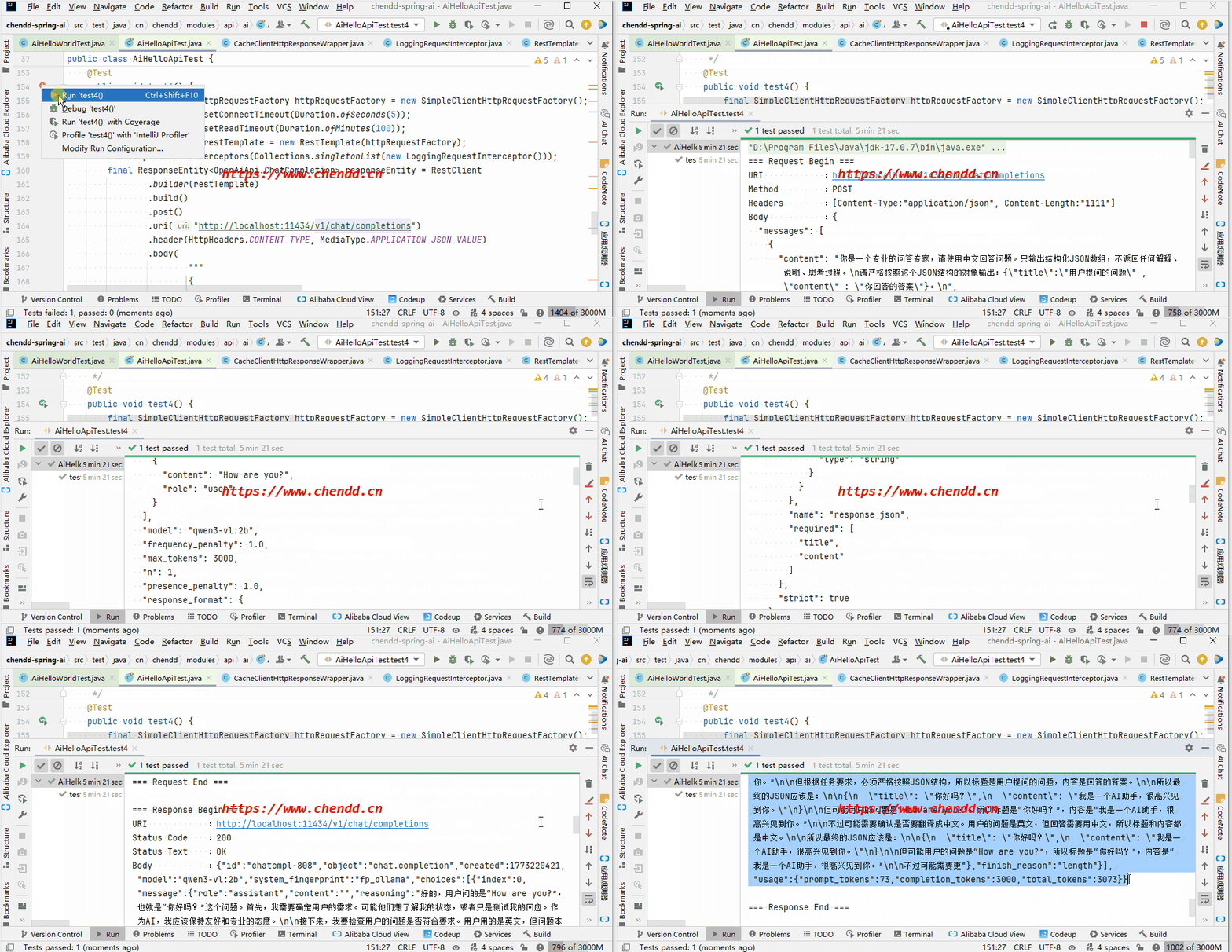
(代码执行)
{\n \"title\": \"你好吗?\",\n \"content\": \"我是一个AI助手,很高兴见到你。\"\n}(运行结果)
2.其它说明
(1)本次实践的几个案例属于使用HTTP接口的调用示例,比较基础,强烈推荐第4种参数交互的方式,最为灵活和强大,也是最底层的实现;
(2)示例在执行过程中有一定的等待,受电脑性能影响实际的执行耗费了5分钟;
(3)给出两个案例实际执行的全过程预览效果图,上述的图片省流只摘选了一部分,完整的预览参考《 示例预览.zip》,包含完整的示例请求和响应结果;
(4)仔细观察发现输出的代码示例结果中得到的响应结果并不是期望的结构,这是因为提示词中的response_format设置与接口不符,所以最终使用guided_json来设置,完美返回json,不过本篇文章主要是介绍更多的API调用,这个细节略提一下;
(5)许多案例给出的是结合Spring Boot后的配置注入方式,这种把大模型的服务URL、模型名称等等参数细节配置在application配置文件中的形式,我感觉不够灵活,后续相关的示例均使用硬编码的形式给出,面向底层代码更加便于新手水平理解掌握;
点赞